

European Accessibility Act (EAA): Your Compliance Guide
The European Accessibility Act became enforceable on June 28, 2025. It's now October 2025—four months into enforcement.
If you build digital products or services for EU consumers, here's the deal: your products must be accessible, or you face legal penalties. No exceptions, no extensions.
This guide breaks down what the EAA actually means for you—who must comply, what you need to fix, and how to achieve compliance now.
What is the European Accessibility Act?
The EAA (Directive 2019/882) is mandatory EU legislation requiring specific products and services to be accessible to people with disabilities. It applies across all 27 EU member states.
The big shift: Previous EU accessibility laws targeted public sector websites. The EAA extends these requirements to private businesses selling to EU consumers.
The EAA doesn't create new accessibility standards—it requires compliance with EN 301 549, which incorporates WCAG 2.1 Level AA. If you're familiar with WCAG, you already know most of what you need to do.
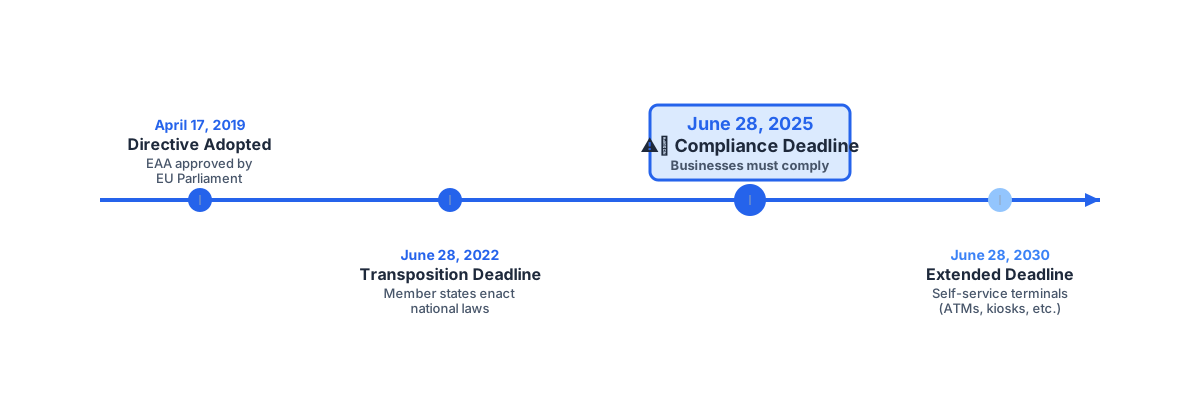
The Enforcement Timeline
- June 28, 2025 – Enforcement began for all in-scope products and services
- June 28, 2030 – Extended deadline for existing self-service terminals (ATMs, kiosks)
What this means: All new products must be compliant from launch. Existing products that launched before June 28, 2025 needed to be fixed by that date. If your products aren't compliant yet, you're operating outside the law.
Enforcement is real and active. EU member states have established penalties and are beginning enforcement actions—more on that later.
Does This Apply to You?
Digital Services Covered by the EAA
The EAA applies if you offer any of these services in the EU:
- E-commerce platforms and websites
- Banking services (online banking, mobile apps)
- E-books and e-reading software
- Telecommunications (voice, messaging, video calls)
- Streaming platforms (video-on-demand, audio services)
- Transportation booking (air, bus, rail, waterborne)
Digital Products Too
- Computers and operating systems
- Smartphones and tablets
- Self-service terminals
- E-readers
- Digital television equipment
Are You Exempt?
Microenterprises (fewer than 10 employees AND annual turnover below €2M) offering services get an exemption. But this doesn't apply to products.
Here's the catch: Even if you're exempt, implementing accessibility is smart business. People with disabilities represent 15% of the global population—that's a massive market you don't want to exclude.
What WCAG 2.1 Level AA Actually Means
The EAA requires WCAG 2.1 Level AA compliance. Instead of listing all 50 success criteria, let's focus on what breaks most often:
The Big Four Categories
Perceivable – Can users see or hear your content?
- Images need descriptive alt text—not "image1.jpg"
- Text needs proper contrast: 4.5:1 for normal text, 3:1 for large text
- Videos need captions
- Use semantic HTML (headings, lists, landmarks)
Operable – Can users navigate and interact?
- Everything must work with keyboard only (no mouse required)
- Focus indicators must be visible
- Interactive elements need to be at least 24×24 pixels
- Page titles and headings must make sense
Understandable – Is your content clear?
- Form fields need proper labels
- Error messages must be specific and helpful
- Navigation should be consistent across pages
- Declare the page language in your HTML
Robust – Does it work with assistive technology?
- Use valid HTML
- ARIA roles and attributes must be correct
- Status messages need to be announced to screen readers
The reality check: Manual testing is overwhelming. A typical e-commerce site has hundreds of pages, thousands of images, and countless interactive elements. How do you know if you're compliant?
This is where A11yied comes in. Instead of manually checking every page, A11yied automatically crawls your entire site, validates against 78+ WCAG success criteria using real browser contexts, and tells you exactly what needs fixing.
Real-World Examples
Example 1: E-commerce Product Images
<!-- ❌ This fails EAA compliance -->
<img src="jacket.jpg" />
<div>$299</div>

<!-- ✅ This passes EAA compliance -->
<article>
  <img
    src="jacket.jpg"
    alt="Black leather motorcycle jacket with silver zippers and quilted shoulders"
  />
  <h3>Classic Motorcycle Jacket</h3>
  <p><span aria-label="Price">$299.00</span></p>
</article>
WCAG 1.1.1 – Non-text Content (Level A)
Screen reader users need descriptive alt text to understand products. "Image" or "jacket.jpg" doesn't cut it—describe what makes the product unique.
A11yied detects this: Scans all images and flags missing or generic alt text, showing you exactly which products need better descriptions.
Example 2: Banking Form Validation
// ❌ This fails EAA compliance - error only visible with color
function TransferForm() {
  const [error, setError] = useState<string | null>(null)

  return (
    <div>
      <input type="text" name="amount" />
      {error && <span style={{ color: 'red' }}>{error}</span>}
    </div>
  )
}

// ✅ This passes EAA compliance - error announced to screen readers
function TransferForm() {
  const [error, setError] = useState<string | null>(null)
  const errorId = 'amount-error'

  return (
    <div>
      <label htmlFor="transfer-amount">Amount to transfer</label>
      <input
        id="transfer-amount"
        type="text"
        name="amount"
        aria-invalid={error ? 'true' : 'false'}
        aria-describedby={error ? errorId : undefined}
      />
      {error && (
        <span id={errorId} role="alert" className="error-message">
          {error}
        </span>
      )}
    </div>
  )
}
WCAG 3.3.1 – Error Identification & 3.3.3 – Error Suggestion (Level AA)
Screen readers must receive error notifications through ARIA live regions. Errors must be programmatically linked to form fields.
A11yied detects this: Validates form labels, error handling, and ARIA attributes to ensure screen reader users get proper feedback.
Example 3: Transportation Booking Map
// ❌ This fails EAA compliance - no keyboard access
function RouteMap() {
  return (
    <div className="map-container">
      <div className="zoom-in" onClick={() => zoomIn()}>+</div>
      <div className="zoom-out" onClick={() => zoomOut()}>-</div>
    </div>
  )
}

// ✅ This passes EAA compliance - full keyboard support
function RouteMap() {
  return (
    <div className="map-container" role="application" aria-label="Route map">
      <div className="map-controls" role="group" aria-label="Map controls">
        <button
          type="button"
          onClick={() => zoomIn()}
          aria-label="Zoom in"
        >
          <span aria-hidden="true">+</span>
        </button>
        <button
          type="button"
          onClick={() => zoomOut()}
          aria-label="Zoom out"
        >
          <span aria-hidden="true">−</span>
        </button>
      </div>
    </div>
  )
}
WCAG 2.1.1 – Keyboard & 4.1.2 – Name, Role, Value (Level A)
Interactive maps must work with keyboard navigation. Use proper <button> elements with descriptive labels—not <div> elements with click handlers.
A11yied detects this: Validates keyboard accessibility and checks that interactive elements have proper roles and accessible names.
What Happens If You Don't Comply?
Each EU member state handles enforcement differently, but penalties are serious:
- Germany: Up to €100,000 per violation
- France: Up to €75,000
- Spain: Up to €1 million for serious violations
Beyond fines:
- Product recall orders
- Prohibition from selling in specific member states
- Legal liability for damages
- Reputational damage from public enforcement actions
The bigger risk: Non-compliant businesses can be excluded from public procurement contracts, lose customers to accessible competitors, and face brand damage.
Don't delay compliance: The EAA is already in effect. Every day you operate non-compliant products increases your legal and business risk.
Your Compliance Roadmap
Step 1: Assess Your Situation (Week 1-2)
Start with an automated audit:
- Run A11yied on your main website or app
- Review the violations by severity
- Understand which WCAG criteria you're failing
Why A11yied over manual testing:
- Faster: Scans your entire site in minutes, not weeks
- More accurate: Uses real browser contexts to measure actual rendered values (contrast ratios, element sizes, focus states)
- Comprehensive: Checks 78+ WCAG success criteria across levels A, AA, and AAA
- Actionable: Every violation includes specific code examples showing how to fix it
Manual testing has its place, but you need automated validation to understand the full scope of your compliance gap.
Step 2: Fix High-Priority Issues (Week 3-12)
Prioritize by impact:
- Critical blockers – Issues preventing core functionality
- High-impact violations – Affecting many users
- Medium-priority issues – With workarounds available
- Low-priority enhancements – Nice-to-haves
Common fixes:
- Add descriptive alt text to images
- Ensure color contrast meets 4.5:1 (normal text) and 3:1 (large text)
- Implement proper heading hierarchy (H1 → H2 → H3)
- Make all interactive elements keyboard accessible
- Add proper form labels and error handling
- Provide captions for video content
Integrate A11yied into your workflow:
- Pre-deployment scanning catches issues before production
- Scheduled audits monitor compliance over time
- Regression detection alerts you when new code breaks accessibility
- Team collaboration with role-based access keeps everyone aligned
Step 3: Build Accessibility into Your Process (Week 13-24)
Make compliance sustainable:
- Update your design system with accessible components
- Train developers on WCAG basics and ARIA patterns
- Add automated accessibility tests to CI/CD pipelines
- Include keyboard navigation in QA workflows
- Use accessible component libraries (Radix UI, React Aria)
- Create content guidelines requiring alt text in your CMS
Set up continuous monitoring:
- Schedule quarterly A11yied audits
- Track accessibility metrics and compliance status
- Maintain an accessibility conformance report (VPAT/ACR)
- Publish an accessibility statement on your website
The key: Don't treat accessibility as a one-time project. Build it into your development process so new features launch compliant from day one.
Why A11yied is Built for EAA Compliance
Browser-Accurate Validation
Unlike static analyzers that parse your HTML, A11yied uses Playwright to test in real browser contexts. This means:
- Actual color contrast ratios from computed CSS, not source code
- Real element dimensions for target size validation
- Visible focus states to verify keyboard navigation works
- Computed ARIA values reflecting what assistive technology actually sees
This catches issues that simple HTML validators miss—you're testing what users actually experience.
Comprehensive WCAG Coverage
A11yied implements 78+ WCAG success criteria across levels A, AA, and AAA, including WCAG 2.2 requirements:
- Focus appearance validation (2.4.11, 2.4.12, 2.4.13)
- Target size verification (2.5.8)
- Color contrast testing (1.4.3, 1.4.6, 1.4.11)
- Form label associations (3.3.2)
- Keyboard accessibility checks (2.1.1, 2.1.2)
Multi-Page Site Scanning
EAA compliance applies to your entire digital service, not just your homepage. A11yied:
- Discovers pages through sitemap analysis
- Crawls multiple pages to identify site-wide issues
- Aggregates violations across your web presence
- Prioritizes issues by frequency and impact
Example: If 200 product pages have the same missing alt text pattern, A11yied identifies this as a systematic issue requiring a template fix—not 200 individual problems.
Actionable Reports
Every violation includes:
- Specific WCAG success criterion with level (A, AA, AAA)
- Plain-language explanation of why it matters
- Which disabilities are affected
- Code examples showing the current issue and recommended fix
- Impact assessment for prioritization
No more guessing what "insufficient color contrast" means—you get the exact hex values and a code snippet showing compliant contrast.
Common Questions
Does the EAA apply to businesses outside the EU?
Yes, if you serve EU consumers. Like GDPR, the EAA has extraterritorial reach—any business targeting the EU market must comply.
Is WCAG 2.1 Level AA enough?
WCAG 2.1 Level AA meets core technical requirements for digital content (via EN 301 549). However, the EAA also covers packaging, instructions, and customer service—consult legal counsel for full requirements.
What about WCAG 2.2?
EN 301 549 currently references WCAG 2.1, but will likely update to WCAG 2.2. Implementing WCAG 2.2 Level AA now future-proofs your compliance and provides better accessibility. A11yied already includes WCAG 2.2 success criteria.
Can small businesses ignore the EAA?
Microenterprises are exempt from service requirements but NOT product requirements. Even if exempt, accessibility expands your customer base and demonstrates social responsibility.
How is the EAA different from the Web Accessibility Directive?
The Web Accessibility Directive applies to public sector websites. The EAA extends requirements to private sector businesses.
Achieve Compliance Now
The EAA is in effect. If your products aren't compliant, you're exposed to legal and business risks that grow with each passing day.
The business case beyond compliance:
- Expanded market reach to 87 million Europeans with disabilities
- Better user experiences for everyone
- Future-proofing as accessibility becomes standard
- Competitive differentiation in accessibility-aware markets
- Legal risk mitigation across EU member states
Ready to achieve European Accessibility Act compliance?
A11yied helps development teams achieve EAA compliance through comprehensive WCAG testing, browser-accurate validation, multi-page scanning, and actionable reports with specific fixes.
Start your free accessibility audit with A11yied and discover exactly what your products need to achieve compliance.
This guide is updated regularly to reflect evolving EAA implementation. Last updated: October 2025. For legal advice specific to your business, consult qualified counsel.